Task Statuses
Learn how task statuses are determined and what each colored status tag and its day count mean.
Overview
Task statuses show you at a glance where each task stands in its lifecycle. When you look at a task, you'll see a colored tag with a number. That tag tells you:
How urgent the task is (indicated by the color)
How much time you have (indicated by the number)
The system automatically calculates these statuses based on today's date and when the task is due, so you always see current information.
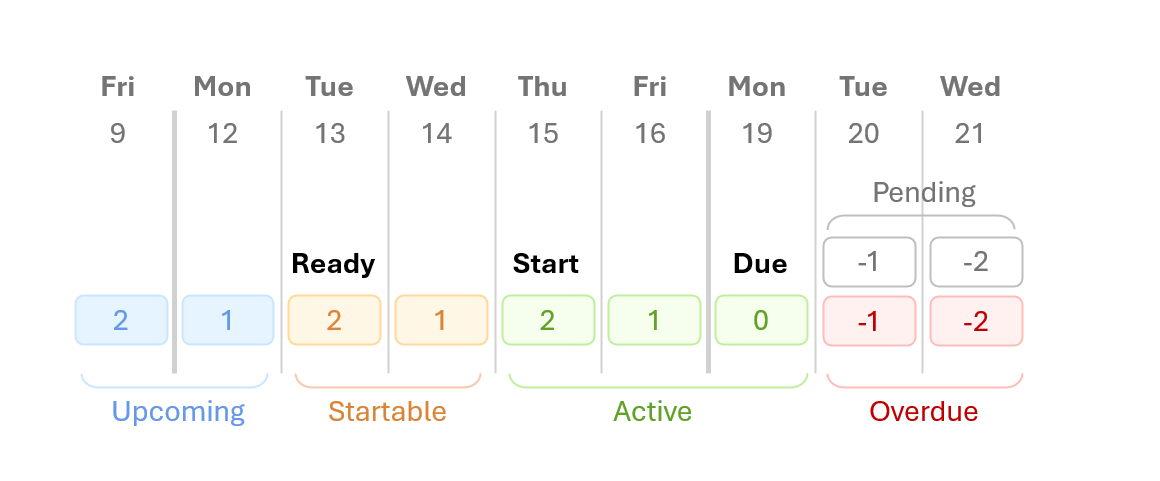
Understanding the Status Tags
Each status appears as a colored tag on your tasks. Here's what each one means and what you should do:
🔵 Upcoming (Blue Tag)
What it means: This task isn't ready to start yet.
The number: Shows how many working days until you can start this task.
Example: A tag that says 5 means you have 5 working days before you can start.
🟠 Startable (Orange Tag)
What it means: You should start this task soon or get it scheduled.
The number: Shows how many working days you have left before the deadline passes for starting.
Example: A tag that says 2 means you need to start within the next 2 working days to finish on time.
🟢 Active (Green Tag)
What it means: This is the final working day to work on this task.
The number: Shows how many working days left until the due date. A tag that shows 0 means it is due today.
Example: A tag that says 1 means the task is due tomorrow.
⚫ Pending (Gray Tag)
What it means: This task is overdue, but the lot manager has not confirmed if it has been completed or not.
The number: Shows how many days overdue it is (negative number).
Example: A tag that says -3 means it's 3 days past due.
🔴 Overdue (Red Tag)
What it means: This task is past its due date and needs immediate attention.
The number: Shows how many days overdue it is (negative number).
Example: A tag that says -5 means it's 5 days past due.
How It Works
The system looks at three pieces of information to calculate each task's status:
Today's date - The current day
When you can start - The earliest date work can begin
When it's due - The deadline for completion
How long it takes - How many working days the task requires (doesn't include weekends)
Based on these dates, the system assigns the appropriate status and counts down the working days.
Important: The system only counts working days (Monday through Friday). Weekends and holidays don't count toward your deadlines.
Example: A 3-Day Task
Let's say you have a task due Friday, June 27, and it takes 3 working days: